text2map.theme: Theme for ggplot2



This is an R Package for customizing the ggplot2 aesthetics. See also text2map.
Installation and Usage
library(remotes)
install_gitlab("culturalcartography/text2map.theme")

# Basic setup (uses viridis colors)
text2map.theme::set_theme()
Themes
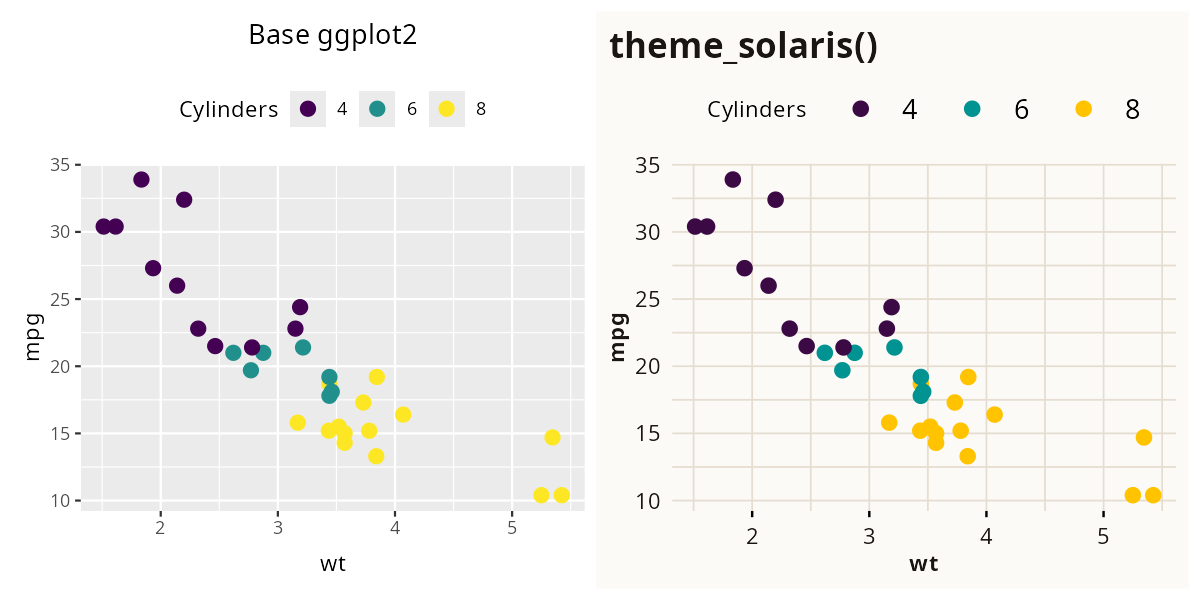
text2map.theme provides two ggplot2 themes: the default white background theme and the solaris theme with a warm cream palette.
Global Palette Options
text2map.theme includes four palette options:
# Default: Perceptually uniform (best for digital/accessibility)
text2map.theme::set_theme(palette = "viridis")

# Inferno: Dark purple to bright yellow, perceptually uniform
text2map.theme::set_theme(palette = "inferno")

# Grayscale: Best for textbook printing
text2map.theme::set_theme(palette = "grayscale")

# Solaris: Custom purple-to-gold warm palette
text2map.theme::set_theme(palette = "solaris")
Note: This setting applies globally to all subsequent ggplot plots.
Font Configuration
The package bundles Open Sans and Lato fonts for offline use. To enable these, set set_font = TRUE.
# Use Lato instead of default Open Sans
text2map.theme::set_theme(set_font = TRUE, base_family = "Lato")

# Use 'extrafont' for legacy support (showtext is default/recommended)
text2map.theme::set_theme(set_font = TRUE, font_method = "extrafont")
Rendering Recommendation: We recommend font_method = "showtext" (default) for best cross-platform rendering.
Related Packages
There are four related packages hosted on GitLab:
-
text2map: text analysis functions -
text2map.corpora: 13+ text datasets -
text2map.dictionaries: norm dictionaries and word frequency lists -
text2map.pretrained: pretrained embeddings and topic models
The above packages can be installed using the following:
install.packages("text2map")

library(remotes)
install_gitlab("culturalcartography/text2map.corpora")
install_gitlab("culturalcartography/text2map.pretrained")
install_gitlab("culturalcartography/text2map.dictionaries")
Contributions and Support
If you have any suggestions to improve this theme – especially for accessibility – send us an email (maintainers [at] textmapping.com) or submit pull requests.
Please report any issues or bugs here: https://gitlab.com/culturalcartography/text2map.theme/-/issues